
GitLab CVE-2026-85706: unauthenticated arbitrary file read (CVSS 10.0)
CVE-2026-85706: a CVSS 10 flaw in GitLab's repository API lets an anonymous attacker read any file on the server. Mechanism, affected versions, detection and the fix.
A perfect score, and a single request
On September 10, 2026, GitLab shipped its monthly patch for the self-managed Community and Enterprise editions. Eighteen flaws fixed, and one that dwarfs the rest: CVE-2026-85706, rated 10.0 on the CVSS scale. You don't run into many 10.0s in a year. This one earns it.
The summary fits in a sentence: with no account, no password, no interaction whatsoever, a stranger sends an HTTP request and pulls back the contents of any file on the server. The secrets file, the database config, your CI/CD runner tokens. If the GitLab process can read it, so can the attacker.
What makes this advisory stand out isn't the severity, we see plenty of those. It's the tempo. The patch lands on the 10th, the first probes hit on the morning of the 11th, and CISA lists the flaw as actively exploited the same day. Which is to say, you didn't have until the next maintenance window.
What follows: the mechanism (it's worth a look), why "file read" badly understates the damage, how to tell whether you're affected and whether you've already had a visitor, and what to do. The patch, yes, but not only that.
The facts, as the advisory lays them out
| Item | Value |
|---|---|
| Identifier | CVE-2026-85706 |
| Fix | GitLab CE/EE 19.3.2, 19.2.6 and 19.1.8 (September 10, 2026) |
| Class | Path traversal (CWE-22) + missing authentication, arbitrary file read |
| CVSS | 10.0 (v3.1), vector AV:N/AC:L/PR:N/UI:N/S:C/C:H/I:H/A:N |
| Component | Repository API, via Workhorse |
| Affected versions | 18.7 to 19.1.7, 19.2.0 to 19.2.5, 19.3.0 to 19.3.1 |
| Precondition | Reachable instance; at least one public project on the observed path; no authentication |
| Scope | Self-managed only (GitLab.com and Dedicated not affected) |
| Reporter | s3ntago, via GitLab's HackerOne bug bounty program |
| Status | Exploited in the wild, added to the CISA KEV catalog, public PoCs |
Two things worth stating before we go further. First, the 10.0 isn't inflated. You'd assume a "file read" tops out on confidentiality and leaves integrity alone, but the vector says otherwise. The S:C means the flaw escapes the application to reach the host filesystem, and the I:H means integrity really is affected, because reading the right file then lets you forge valid session tokens. The read opens the door to writing.
Second, the "at least one public project" precondition. That's the condition of the attack path observed in the first PoCs, not necessarily the only way in: researchers who looked closely note that other mechanisms may not need it. So don't count on having no public projects as a defense.
The mechanism, line by line
The bug doesn't live in either component on its own. It lives in the gap between them.
A quick refresher. In front of the Ruby application (served by Puma, with the Grape framework for the API) sits Workhorse, a reverse proxy written in Go. Workhorse isn't a dumb relay: it intercepts certain routes to handle them itself, in particular everything involving file uploads. The normal upload flow goes like this. The client sends its file, Workhorse writes it to disk in a temporary location, then hands off to Rails with trusted metadata: a file.path field pointing at that temp file, a file.size, and so on. Rails reads file.path without a second thought, since the path came from Workhorse, not from the client.
Which leaves the question of how Workhorse recognizes the routes to intercept. It matches the URL against its regular expressions, and it does so on the encoded form of the path (Go's EscapedPath()). Puma, on the other hand, decodes the %XX sequences before Grape dispatches the request. The two aren't looking at the same string. That's the whole thing.
The attacker encodes a single letter of an otherwise static path segment:
POST /api/v4/projects/1/repository/%66iles/anything?file.path=/etc/passwd&file.size=1 HTTP/1.1
Host: target
%66 is the letter f. To Workhorse, the path is /repository/%66iles/…, which matches none of its upload routes: it doesn't intercept it, doesn't rewrite anything, forwards the request as is, with the client-supplied metadata. To Rails, once %66iles decodes to files, it's a perfectly valid API route, and it reaches the file handler. That handler finds a file.path in the request, assumes Workhorse put it there as usual, and runs the equivalent of File.read(file.path). Except this time, file.path is whatever the attacker wrote. Authentication falls through the same hole: the check that should have applied was carried by Workhorse's handling, short-circuited along with it.
The same trick works on the other segments: %63ommits for commits, %72epository for repository.
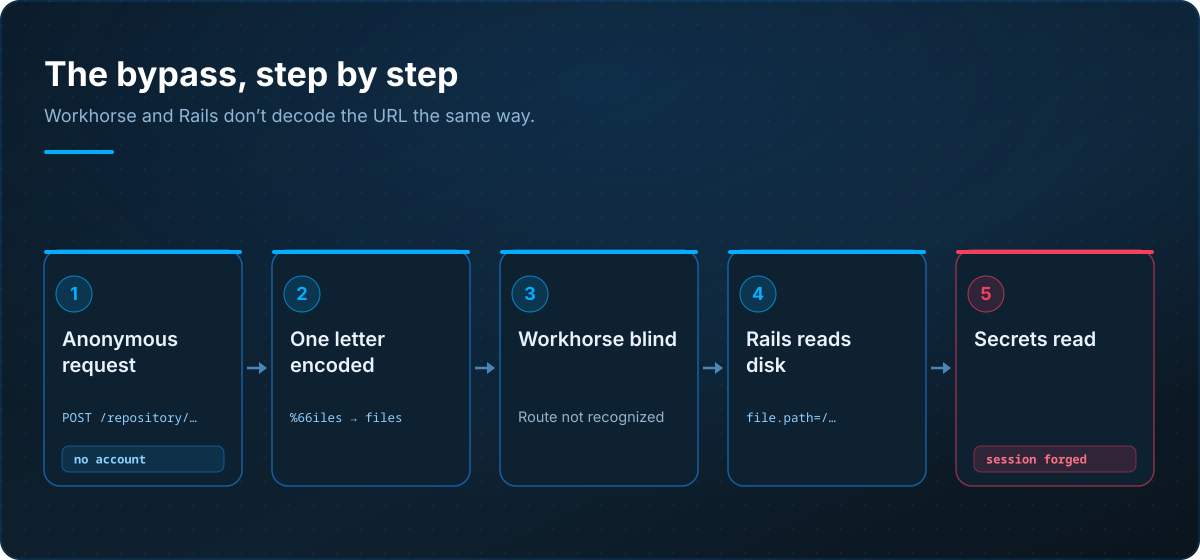
One detail that serves attacker and defender alike: the responses have a signature. On a vulnerable instance, a request pointed at a non-existent file returns a 400 with "local file not present", proof that the bypass worked and the handler actually tried to read. On a patched instance, the same request returns a 401 Unauthorized, because authentication now runs first. That difference is what non-intrusive probes rely on: the published Nuclei template targets a deliberately absent path and reads the status code, without ever exfiltrating a real file.
Why "file read" is an understatement
The file everyone goes for first is gitlab-secrets.json (or its equivalent in gitlab.rb). It holds the instance's master keys, starting with secret_key_base. That key signs Rails's session cookies and a good chunk of the application's signed tokens. Holding it isn't just reading one more secret: it's being able to craft a valid session, administrator included, without knowing a single password. On older GitLab versions, knowing secret_key_base alone was enough to reach remote code execution, through deserialization chains that the key lets you sign. There's the I:H from the vector: the read leads to forgery.
And the same file yields the rest. db_key_base and otp_key_base encrypt, at rest, the CI/CD variables, access tokens and two-factor secrets. Reading them lets you decrypt what GitLab was careful to store encrypted. Add the classic targets of a git process on disk: .gitlab_shell_secret, the runner registration tokens, database.yml, the host SSH keys, deploy tokens. In a handful of requests, an anonymous attacker goes from "I see a GitLab on the internet" to "I hold enough to impersonate an administrator and decrypt your secrets."
From anonymous request to CI/CD chain compromise
- 1
Exposed self-managed instance
a GitLab UI reachable from the internet, with at least one public project.
- 2
Encoded API request
a POST to /repository/%66iles/ with a file.path pointing outside the repository.
- 3
Workhorse bypass
the encoded route isn't recognized, authentication and confinement fall away.
- 4
gitlab-secrets.json read
secret_key_base, db_key_base and the encryption keys leave in cleartext.
- 5
Forged administrator session
the signing key lets you craft a valid cookie, with no password.
CI/CD chain compromised
decryption of variables, runner tokens, access to code and deployments.
The timeline, and what it demands
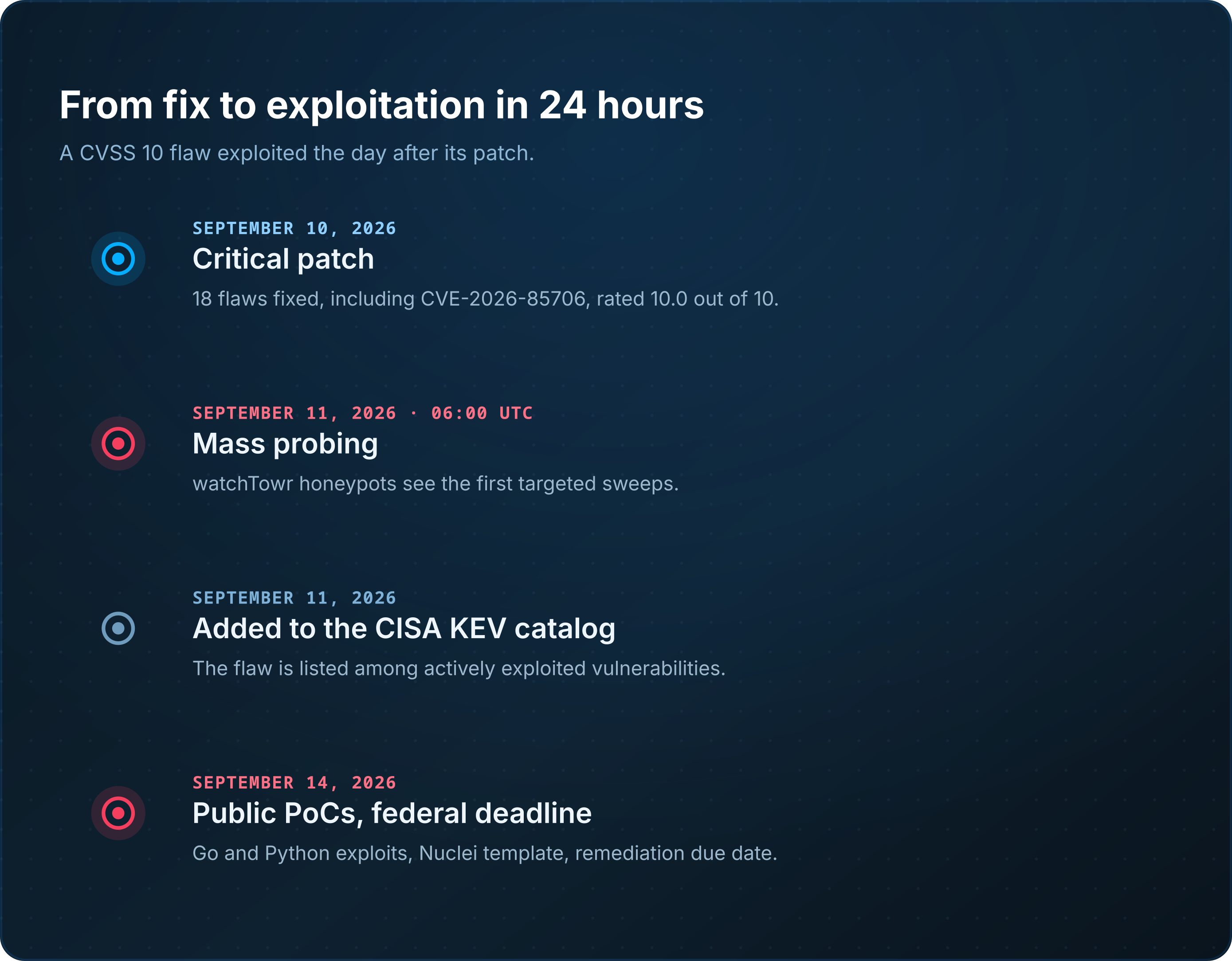
The fix ships on September 10. By the morning of the 11th, around 06
UTC, watchTowr's honeypot network logs probes aimed squarely at this endpoint: actors had already reverse-engineered the patch. That same day, CISA lists the flaw as actively exploited, with a remediation deadline of September 14 for U.S. federal agencies. Right behind, public PoCs appear on GitHub, in Go and Python, plus a Nuclei detection template.None of that tempo is surprising. A security patch points at the modified file, hence the faulty function, hence the reasoning behind the attack: on a flaw as easy to replay as an encoding mismatch, a few hours are enough to go from diff to PoC. The practical takeaway is blunt. For a vulnerability of this profile, the window between "the patch exists" and "I'm being scanned" is measured in hours.
Who is affected
You're affected if you run a self-managed GitLab instance (Omnibus, source, or Helm chart) in one of these ranges.
| GitLab branch | Status |
|---|---|
| 18.7 to 19.1.7 | Vulnerable, upgrade to 19.1.8 |
| 19.2.0 to 19.2.5 | Vulnerable, upgrade to 19.2.6 |
| 19.3.0 to 19.3.1 | Vulnerable, upgrade to 19.3.2 |
| 19.1.8 / 19.2.6 / 19.3.2+ | Fixed |
| GitLab.com | Not affected (already patched) |
| GitLab Dedicated | Not affected (no action required) |
If your GitLab lives on gitlab.com or on the Dedicated offering, GitLab has already rolled out the fix, and you have nothing to do. For everything else, it's the machines you forget that pay: a runner installed in a corner, an internal instance that's "not exposed" until a poorly segmented VPN makes it reachable, a test server hosting a mirror of production.
Am I vulnerable? Have I been visited?
My version. This is the decider. The admin banner shows it, or from the command line on the host:
# Omnibus edition
gitlab-rake gitlab:env:info | grep -i version
cat /opt/gitlab/version-manifest.txt | grep -i '^gitlab-ce\|^gitlab-ee'
If the number falls in one of the ranges above, the host is vulnerable until proven otherwise.
Have I been probed, or read? The bypass leaves a recognizable trace: requests to the repository API with a partially encoded path segment (%66iles, %63ommits, %72epository) and a file.path parameter.
# Suspicious requests to the repo API: encoded segment or file.path
grep -Ei '/repository/%[0-9a-f]{2}|file\.path=' \
  /var/log/gitlab/nginx/gitlab_access.log \
  /var/log/gitlab/gitlab-rails/production_json.log \
  /var/log/gitlab/gitlab-rails/api_json.log
Here one thing matters more than the rest: the status code and the size of the response. A wall of 400 ("local file not present") or 401 is scanning, noise. A 200 with an abnormally large body on one of those routes suggests a file actually left. At that point you're no longer closing a door, you're treating the secrets as compromised.
My exposure. From outside your network, check whether the interface answers where it shouldn't. A test instance reachable from the front is an emergency in its own right, regardless of version.
What to do now
The patch isn't enough. If your instance was exposed, even briefly, on a vulnerable version, assume secrets may have leaked, and rotate them.
- Apply the patch, now. Upgrade to
19.3.2,19.2.6or19.1.8for your branch, or later. There is no official workaround: the patch is the only real answer. The Omnibus update is a routine operation (apt/yumthengitlab-ctl reconfigure), and multi-node deployments handle the rollover without downtime. - Cut the exposure in the meantime. If you can't patch within the hour, take the interface off direct internet access: VPN, bastion, or an allowlist at the reverse proxy. It doesn't fix the flaw, it buys time.
- Rotate secrets, if the instance was exposed unpatched. This is the step people skip and regret. The contents of
gitlab-secrets.json(secret_key_baseand the other keys, with agitlab-ctl reconfigureafter regeneration), the database credentials, all personal access tokens, deploy keys and tokens, the runner registration and authentication tokens, OAuth secrets, every CI/CD variable holding a credential. And the host SSH keys. - Hunt for traces. Once the secrets are presumed readable, they may have been used. Comb the audit log: unknown token creation, project exports, group membership changes, SSH key additions, unexpected administrator logins. That's where a successful exploitation shows, not just an attempted one.
The two other flaws worth keeping in view
The September 10 patch closes eighteen. Two deserve a mention, because they're serious and easy to blur with the headliner.
CVE-2026-87719 (CVSS 9.9) is an insecure deserialization in the GraphQL subscription serializer, Enterprise edition only. An authenticated user with Duo Chat access can, through a crafted GraphQL argument, retrieve the Advanced Search configuration and sensitive credentials. It needs an account, unlike the headliner, but its score is nearly as high.
CVE-2026-88765 (CVSS 8.5) is a buffer overflow in the Unicode conversion wrapper used by search indexing (Enterprise as well). An authenticated user reaches remote code execution by importing a specially crafted Git project export.
In short, this patch isn't "one critical and some filler." It applies as a whole.
What this says about your GitLab
A forge server concentrates the code, the deployment secrets, the environment access, the tokens that drive your runners. A file-read flaw there is worth, in practice, far more than read access: it hands over the keys that open everything else. And it's often the least-watched machine in the estate. You install a GitLab "for the team", you never file it under critical assets, and it's exactly that one you find exposed on audit day.
The right question, after an alert like this, isn't only "am I up to date?". It's "what, in my estate, is reachable from the internet without me really deciding it should be?". A test GitLab left on the front, a runner exposing an interface, a forgotten mirror. That's what an external attack surface inventory reveals, and what a well-targeted vulnerability scan cross-references against known vulnerable versions, provided your information system map actually contains those machines. Today's flaw is fixed with one command; the blind spot that left it reachable takes a method.
Frequently asked questions
Which GitLab versions are affected?
Self-managed CE and EE editions, from 18.7 to 19.1.7, from 19.2.0 to 19.2.5, and from 19.3.0 to 19.3.1. The fix is in 19.1.8, 19.2.6 and 19.3.2. GitLab.com and GitLab Dedicated are not affected.
I've patched. Is that it?
Not if your instance was exposed on a vulnerable version, even briefly. The patch closes the door, but secrets read beforehand are still usable. Rotate secret_key_base, the database credentials, the runner tokens, the CI/CD variables and the access tokens.
Is my instance vulnerable with no public project?
The attack path observed in the first PoCs needs at least one public project. But other variants may not, so don't treat the absence of a public project as protection. Patch.
How do I tell exploitation from a plain scan?
In the logs, a 400 or 401 on those requests is an attempt or a sweep. A 200 with an abnormally large body is the sign of a successful read: treat it as an incident.
Why don't Workhorse and Rails see the same path?
Workhorse matches the URL against its routes on the encoded form of the path, while Puma decodes the %XX before the application routes the request. By encoding one letter of a static segment, you make the two readings diverge: Workhorse no longer recognizes the route and lets it through, Rails recognizes it once decoded. The bypass lives in that gap.
To close
CVE-2026-85706 is no sophisticated exploit: it's a decoding disagreement between two components that should have read the same URL the same way. Its simplicity is exactly what makes it dangerous. One request, no account, and the file holding your instance's keys goes out over the internet. The 10.0 is earned, exploitation started in under a day, and the patch alone doesn't close everything: what may have leaked still has to be regenerated.
Two moves, in order. Upgrade to 19.3.2, 19.2.6 or 19.1.8 without waiting for the next maintenance window. And if the instance was exposed, treat your secrets as compromised and regenerate them. The rest is a matter of inventory.
Have Flawfence analyze your exposure: we map what answers in your name from the internet, forges and admin interfaces included, and we tell you what to close and what to rotate first.
Sources
- GitLab, "Critical Patch Release: 19.3.2, 19.2.6, 19.1.8"
- CISA, "CISA Adds One Known Exploited Vulnerability to Catalog" (September 11, 2026)
- watchTowr, "Rapid Reaction: GitLab Critical Path Traversal Vulnerability (CVE-2026-85706)"
- Horizon3.ai, "CVE-2026-85706"
- Rapid7, "CVE-2026-85706: Critical GitLab Path Traversal Exploited in the Wild"
- BleepingComputer, "GitLab urges users to patch max severity path traversal flaw"
- Nuclei Templates project, PR #17231 (CVE-2026-85706 detection template)
Let’s discuss your external exposure
Request a personalized Flawfence demo and discover your real exposure level.